
Description
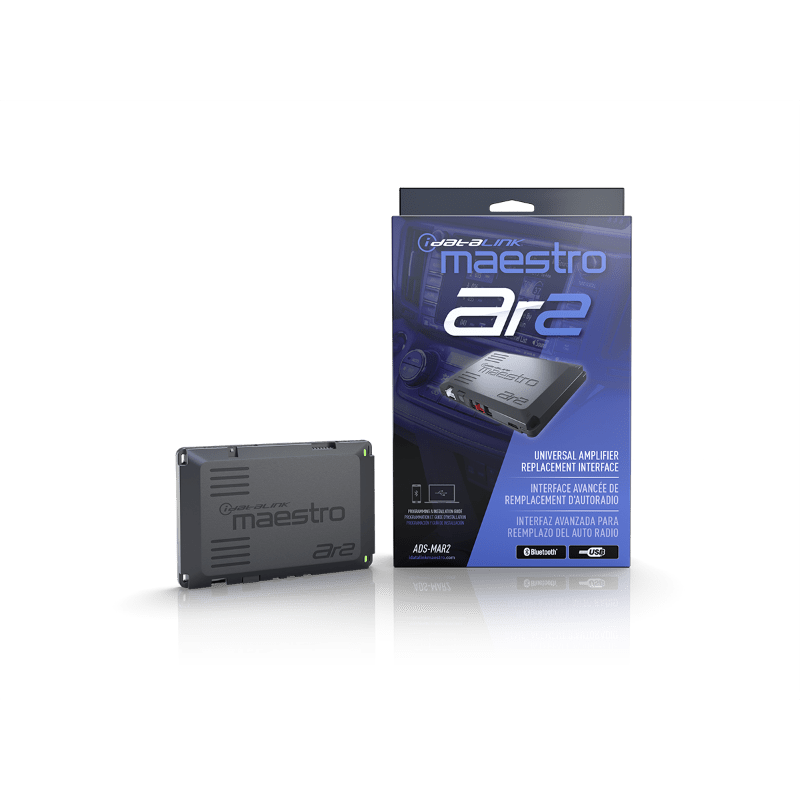
iDatalink Maestro AR2 Amplifier Replacement Interface
If the factory radio is staying but the factory amplifier is holding the rest of the system back, AR2 gives us a much cleaner way to take control.
Premium factory audio is rarely just a radio feeding an amplifier. The OEM amp may be splitting channels, applying EQ, setting crossover points, handling warning tones and managing how the radio communicates with the rest of the vehicle. Tapping speaker outputs after all of that can work, but it means the new DSP or amplifier has to start by cleaning up processing we never wanted in the first place.
Maestro AR2 moves the integration point upstream. In supported vehicles, it lets us replace the premium factory amplifier while keeping the factory radio and supported vehicle functions intact. It can also be used in supported non-amplified applications when we want a vehicle-specific signal and wiring path into a new amplifier or DSP without cutting up the original radio harness.
Why AR2 Is the More Flexible Maestro Path
The original Maestro AR is a strong solution when the downstream DSP or amplifier is already built around the Maestro data connection. AR2 keeps that option, but it also gives us six analog RCA outputs and a TOSLINK digital output for conventional aftermarket equipment.
The six RCA channels are the better choice when the downstream equipment needs separate front, rear and subwoofer analog feeds and we want supported factory fade/balance behavior carried into that analog path. The TOSLINK output is a two-channel digital audio feed, which is useful when the downstream DSP has optical input and will handle the channel routing itself.
That difference matters. TOSLINK is not simply “six RCA channels in optical form.” If the build depends on factory fader behavior across separate analog zones, the RCA path can make more sense. If the goal is to hand a clean stereo digital feed to a capable DSP and let that processor build the system from there, optical can be the cleaner architecture.
Three Ways AR2 Can Fit a Build
On a supported factory-amplified vehicle, AR2 connects through the correct Maestro AR/DSR1 T-harness at the factory-amplifier location and replaces the OEM amp integration point.
On a supported non-amplified vehicle, the proper DSP T-harness can connect at the factory radio so the new processor/amplifier can be added without cutting the vehicle harness.
With compatible Maestro partner amplifiers and DSPs, AR2 can also use the supported serial-data connection instead of relying only on RCA or optical. That lets the vehicle integration and compatible processor communicate directly where the equipment supports it.
Where It Fits in a Real System
Say the customer likes the factory screen, steering-wheel controls and OEM feel but wants a real active front stage, more power and proper DSP tuning. AR2 lets us keep the radio and remove the factory amplifier from the middle of the audio chain. From there, the new DSP and amplifiers can be chosen around channel count, power, tuning capability and packaging instead of around what the factory amp was forcing us to work around.
That is the difference between adding equipment to a factory system and actually redesigning the system. AR2 is useful because it gives us options on the aftermarket side without giving up the supported vehicle integration on the factory side.
Programming and Fitment Still Matter
AR2 is not universal. The exact vehicle, factory audio configuration and matching Maestro T-harness have to be supported together, and the module must be programmed for the vehicle before installation. Weblink Desktop is supported, and AR2 also includes built-in Bluetooth for supported mobile programming.
The year, make, model, trim, factory amplifier or radio architecture, harness and downstream equipment must be compatible as one system. If the vehicle requires original AR, DSR1 or A2B, use that integration path instead. The goal is not to force AR2 into every build; it is to use the integration architecture that makes the rest of the system easier to design and tune.
Manufacturer Specifications
- Model: ADS-MAR2
- Product type: Maestro AR2 universal amplifier replacement / DSP integration interface
- Supported use: Compatible factory-amplified system replacement
- Additional supported use: Amplifier/DSP integration in compatible non-amplified systems
- Vehicle connection: Uses supported Maestro AR/DSR1 or DSP T-harnesses depending on the application
- Maestro partner connection: Serial-data connection to compatible amplifiers and DSPs
- Analog outputs: Six RCA channels, typically front/rear/subwoofer
- Digital output: Two-channel TOSLINK optical audio for compatible DSPs/amplifiers
- Factory fade/balance: Retention depends on output path and application; the two-channel optical path does not provide separate analog front/rear fader channels
- Programming: Weblink Desktop
- Bluetooth: Built in for supported wireless/mobile programming
- Vehicle-specific programming: Required before installation
Included
- ADS-MAR2 interface module
- RCA output harness
- 4-pin data cable
- 3-wire harness
- USB-A to USB-C programming cable
Required separately: Compatible vehicle-specific Maestro T-harness and aftermarket amplifier or DSP.
Manufacturer: iDatalink Maestro
Where this fits in the build
This is a system-control or DSP component. The correct choice depends on the signal path, channel count, routing, retained features and the rest of the amplifier and speaker plan.